Showing posts with label Free. Show all posts

Google Chrome 3 Brings More Speed and Features to the Stable Release

0 comments

Windows only: Chrome turned one year old just a couple weeks back, and as a belated celebration, the folks at Google have just pushed out a brand new stable release in the form of Google Chrome 3.

Those of you who haven't been eager to play on the bleeding edge of Chrome releases have a lot of nice improvements in store for them in Chrome 3, including:

  • Speed Improvements: Chrome 3 is faster than any previous stable release on both the V8 and SunSpider benchmarks. (Google's calling it a 150% increase in Javascript performance since their first beta.) In the current Chrome 4 dev release, Chrome continues to outshine other browsers on most speed benchmarks.
  • The New Tab Page: Again, this is only new to those of you who've been sticking to stable releases, but the new tab page is more customizable, allowing you to rearrange thumbnails via drag and drop and pin thumbnails you want to keep around permanently.
  • Better Omnibox: Firefox has its awesome bar, Chrome has its omnibox. As of the stable Chrome 3 release, the omnibox adds contextual icons to help you see whether autocomplete results are suggest sites, searches, bookmarks, or sites from your history.
  • HTML5: Google has been pushing the envelope with what developers can do with HTML5, the new standard set of tools in the next evolution of HTML (the backbone of web pages). In Chrome 3 stable, HTML5 is standard—meaning support for video, audio, and canvas tags that bring a rich web experience to your browser without the need for third-party plug-ins like Flash.
  • Themes: We've highlighted a handful of the great new Google Chrome themes already, but now they're available to the stable channel users, as well.
Of course, none of this is all that exciting if you've been using the beta or dev channels for your Chrome updates, but if your workplace, for example, won't let you use anything but stable releases of software, the stable Chrome update is very welcome. Chrome 3 stable is a free download, Windows only.

(Note: Google continues its rather speedy version number jumping here—having dropped three "major" releases in just over a year. It may seem a little silly that it's now on the same version number as Firefox and looks like it'll easily beat Firefox to 4.0, but keep in mind that version numbers are largely arbitrary, so while Google may well hit Chrome 10 in another year or two, it has little bearing on how it compares to other browsers.)

Google Chrome [via Official Google Blog]


iTunes 9

0 comments


Hot on the heels Last week apple has announcement itunes 9, and it looks awesome I've tested it on my PC windows it has some cool new features.

User Interface

Apple's design decisions often make their first (or only) appearances in iTunes - and there's certainly some interesting choices in iTunes 9. The main window has a new gradient - slightly lighter than before - that also makes the window look a little unusual when inactive. There's also some new Play / Skip / Rewind buttons that protrude from the UI chrome a little more than before - as well as a heavily emphasised Search box.


iTunes description


Manage and play your music collection with drag-and-drop simplicity

Enjoy iTunes, the best friend an iPod will ever have! Working on your Windows OS.

iTunes is the easiest way to organize, share and listen to music on your computer. Find new favorites. Manage your growing library. Enjoy iTunes, the best friend an iPod will ever have! Working on your Windows OS.

Music Videos
The virtual shelves of the iTunes Music Store now feature music videos. Preview, browse and buy classics, new releases and iTunes exclusives for just $1.99.

TV Shows
You watch them at home. Now download them and take them on the road with the new iPod. Shop for your favorite NBC, ABC and Disney TV shows, only on iTunes.

MiniStore
Discover new music as you enjoy your collection or import new CDs with MiniStore" right from your iTunes library.

Sync Home Movies
Create iPod-compatible versions of your own movies using iTunes.

AirTunes Enhancement
Simultaneously stream the same song wirelessly to up to three home stereos or powered speakers " using AirPort Express with AirTunes.

Requirements:

· A PC with a 1GHz Intel or AMD processor
· Playing videos purchased on the iTunes Store requires an Intel Pentium D or faster processor
· Playing HD-quality videos purchased on the iTunes Store requires a 2.0GHz Intel Core 2 Duo or faster processor
· 512MB of RAM; 1GB is required to play HD-quality videos
· A DirectX 9.0-compatible video card with 32MB of video RAM; 64MB recommended
· A QuickTime-compatible audio card
· A broadband Internet connection to use the iTunes Store
· An iTunes-compatible CD or DVD recorder to create audio CDs, MP3 CDs, or back-up CDs or DVDs
· QuickTime 7.5.5 or later is required (included)
· 200MB of available disk space
· Screen reader support requires Window-Eyes 7.0 or later

What's New in This Release:

· An improved look and feel, including a new Column Browser for easily browsing your artists or albums, movies, TV shows, and more.
· iTunes Store has a brand new look, with improved navigation for quick and easy exploration.
· iTunes LP and iTunes Extras create unique experiences that feature exclusive interviews, videos, photos, and more — available with select album and movie purchases on the iTunes Store.
· Home Sharing helps you manage your family's iTunes collection between computers in your home. iTunes can automatically transfer new purchases, or you can choose just the items you want.
· Genius Mixes are created for you by iTunes and play songs from your library that go great together.
· iPod and iPhone syncing now allows you to organize your iPhone and iPod touch home screens directly in iTunes. Syncing is now also more flexible, allowing you to sync individual artists, genres, or TV show and Podcast episodes.
· iTunes U items are now organized into their own section in your...


Here take the Chance to try it by urself & tell me What u think in by Comment


Download x32

Download x64


Paint.NET 3.36

0 comments
 
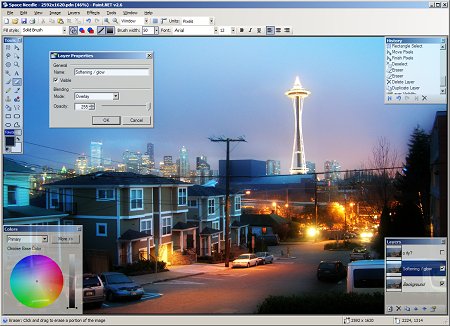
 Paint.NET is free image editing and photo manipulation software designed to be used on computers that run Windows. It supports layers, unlimited undo, special effects, and a wide variety of useful and powerful tools. It started development as an undergraduate college senior design project mentored by Microsoft, and is currently being maintained by some of the alumni that originally worked on it. Originally intended as a free replacement for the MS Paint software that comes with Windows, it has grown into a powerful yet simple tool for photo and image editing.
The programming language used to create Paint.NET is C#, with a small amount of C++ for installation and shell-integration related functionality. Paint.NET can be used to enhance and clean up your photographs. Using the Clone Stamp tool, the power lines that criss-crossed in front of the Space Needle were carefully removed.

Other operations were performed that had the effect of smoothing out the image without blurring it, adding some "bloom" (glow), and increasing the contrast.


FEATURES:
Simple, intuitive user interface
Every feature and user interface element was designed to be immediately intuitive and quickly learnable without assistance. It is also designed to be immediately familiar to users of the original MS Paint software that comes with Windows.

Layers
Usually only found on expensive or complicated professional software, layers form the basis for a rich image composition experience. You may think of them as a stack of transparency slides that, when viewed together at the same time, form one image.

Powerful Tools
Paint.NET includes simple tools for drawing shapes, including an easy-to-use curve tool for drawing splines or Bezier curves. The Gradient tool, new for 3.0, has been cited as a huge improvement over similar tools provided by other software. The facilities for creating and working with selections is powerful, yet still simple enough to be picked up quickly. Other powerful tools include the Magic Wand for selecting regions of similar color, and the Clone Stamp for copying or erasing portions of an image. There is also a simple text editor, a tool for zooming, and a Recolor tool.

Unlimited History
Everybody makes mistakes, and everybody changes their mind. To accommodate this, every action you perform on an image is recorded in the History window and may be undone. Once you've undone an action, you can also redo it. The length of the history is only limited by available disk space.

Special Effects
Many special effects are included for perfecting your images. Everything from blurring, sharpening, red-eye removal, distortion, noise, and embossing are included. Also included is our unique 3D Rotate/Zoom effect that makes it very easy to add perspective and tilting.
Adjustments are also included which help you tweak an image's brightness, contrast, hue, saturation, curves, and levels. You can also convert an image to black and white, or sepia-toned.


Download Firefox 3.5.3 and Firefox 3.0.14

0 comments
 

Starting yesterday 9,Sep,09 Mozilla Released the New update of there Brilliant open source Internet Browser I've Installed the Update & trust me it's looks great & it's working very well actually I hated the previous version, I've faced a lot of Bugs especially with the Extentions they were always not working & it says they are "Not Compatible" WTF... But Lately I've read a useful Post on Lifehacker, turn off compatibility checking in new releases of Firefox so that our old extensions will work with the new release even though they haven't specifically been updated for it.

But u know what
I kept my self using Firefox cuz I knew they'll Fix it cuz they're the Best We just hopping that Mozilla that is speeding up Firefox and improving it sometimes out-of-control memory use but I think this New version looks working with less Memory Usage I hope So, this next Picture shows us the Memory usages in Previous Version WTH.

 Mozilla has confirmed that users currently running Firefox 3.0.14 will be bumped to version 3.5.3. It appears that all users of 3.0.14 will receive a Major Update Offer to Firefox 3.5.3. In addition, those running 3.0.14 will be able to make the jump to 3.5.3 just by using the “Check for updates” option. According to Mozilla, all users of previous versions of Firefox will be served a major update offer around September 30th, 2009. 

   “Starting with the upcoming releases of Firefox 3.5.3 and Firefox 3.0.14, Mozilla will warn users if their version of the popular Adobe Flash Player plugin is out of date. Old versions of plugins can cause crashes and other stability problems, and can also be a significant security risk. For now our focus is on the Adobe Flash Player both because of its popularity and because some studies have shown that as many as 80% of users currently have an out of date version,” Mike Beltzner, director of Firefox at Mozilla Corporation, stated. 

Firefox 3.5.3 and Firefox 3.0.14 for Windows are available for download here.  
Firefox 3.5.3 for Linux is available for download here.
Firefox 3.0.14 for Linux is available for download here


I Support Mozilla ♥♥♥

Google Book Downloader

0 comments
Google Book Downloader is a free utility that lets out download any book that's available in "full view" from Google Books. Of course, most of these books also feature download links right on the web page, but Google Books Downloader lets you queue up multiple jobs and convert all of the downloaded books to PDF files.

Google Books Downloader
The application is available for Windows and requires Microsoft .NET Framework 3.5 SP1. You can either install Google Book Downloader or download a portable version which you can simply unzip and run from your hard drive or a removable disk.

In order to queue up a book for download, just open the "add book" dialog in the file menu and copy an paste the book code, link, or ISBN number, click search, and then select the book that shows up. To begin downloading, right click a title and hit "start." and to export a file as a PDF, right-click and hit "export."

You can find more instructions in the tutorial.

 Download

Smarter Free ways to Manage and Unplug USB devices

0 comments
It is commonly understood that you should never turn off or unplug any device all of a sudden. The primary reason for this is that the particular piece of hardware might be in use by a software or the Operating system itself and might cause unwanted hardware failures.
Keeping this in mind we decided to come up with a hands on guide for USB devices and software recommendations.
Few facts you should know about your  USB device :
  • Whenever you plug in any USB device, Windows do recognizes it and pops up an icon which shows all the USB devices connected.  Anytime you want to disconnect you can use this place to eject or unplug your usb connected device first and then physically unplug it.
  • Its always a good practice to first copy the data which you would like to use from USB device to your hard drive. This way not only your work will get done faster but also you will be less bombarding your device.
  • Most of the USB thumb drives come with an activity light. Make sure the light is not blinking and is turned off. This is an indication that there is no disk activity going on.
  • And lastly dont get on a War with the USB connector when its time to unplug. Do it slowly else not only you will damage your connector you might damage the port on the computer.
My Recommended and tested softwares for managing USB Devices better :

USB Disk Ejector : An excellent freeware with Command line support, mobile mode and easy interface to remove USB devices safely.

USB Disk Ejector 


USB Device view This application is little bit complex but very useful. It gives you a detailed view of all USB devices connected and allows you to even generate a report of it.


Chk Flash : A disk checking software for flash drives which helps you to rectify Read / Write / Logical and Physical Errors. This increase your flash drive life and your data integral.


Flash Drive reminder : If you forget to take off your USB device when you get off the sit, this application  wont let you forget . Excellent software if you are loosing money because you loose your USB more often.


Prevent write access to USB drives with USB write protector : Worried that your USB can be infected by a virus when you plug in to a computer which you are not sure of ? USB Write protector cna lock down your USB and doesnt allow anybody or any software to copy a file into.

USB write protection utility

 These are the ways I recommend to manage your USB devices. How about you ? Which software you had been using ? What practices you follow ? Share with Me in comments.
 
^ Scroll to Top